
Garage Door Remote Not Working? 8 Fixes to Try First
Quick Answer: A garage door remote that suddenly quits is usually a dead battery, a remote that needs reprogramming, a range or interference problem, or the lock button on the wall console. Start with a fresh battery, confirm the wall button still runs the door, then re-pair the remote to the opener. If none of that helps, the opener's receiver or logic board may need a pro.
You press the button, the door does nothing, and you sit in the driveway wondering what just broke. Nine times out of ten it is not the door, and it is not the opener. It is something small and cheap that you can sort out in a few minutes, once you know where to look.
How a Remote Actually Talks to the Opener
Before the checklist, it helps to know what is going on when you press that button. The remote is a tiny radio transmitter. Press the button, and it sends out a short burst on a specific frequency; most modern units run near 315 or 390 MHz, carrying a rolling code that changes every time. Up on the motor unit, a receiver board listens for that exact code. When it hears a code it recognizes, it tells the motor to run.
So a working press needs three things: a remote with enough power to send, a clear signal path, and a receiver that still recognizes the code. Break any one of those and the door stays put. The wall button is wired straight to the opener, so it skips the radio part entirely, which makes it your best diagnostic tool. More on that in a minute.
Knowing the radio is the weak link explains a lot. A phone stays connected across your whole house, but a garage remote is a low-power one-way sender with a range measured in feet, not blocks. It does not take much to knock it out.
Start Here: Is It the Remote or the Door?
Press the wall button: Walk into the garage and press the wall-mounted button (the hardwired one, not a keypad). If the door runs normally from the wall, the opener and the door are fine. The problem lives in the remote or the receiver. If the wall button does nothing either, you are looking at a power, motor, or door problem, not a remote problem, and that is a different visit.
Try a second remote or the keypad: If you have a spare clicker, a second car remote, or an outside keypad, test it. One remote working while another stays dead points straight at the dead one. All of them failing at once points back toward the opener's receiver.
The Battery Is the Number One Culprit
A weak or dead coin cell is the most common reason a remote quits, and it rarely dies with warning. One day the range gets shorter, so you creep closer to the door, and a week later nothing happens at all.
How to change it: Most visor and keychain remotes take a flat coin battery, usually a CR2032 or CR2016. Slide or pry the case open at the seam (a coin or a small flathead helps), note which side of the old battery faces up, and drop the new one in the same way, printed side up in most holders. Snap it shut and test. Keep a two-pack in a drawer, because these cells cost little and go dead at the worst times.
Temperature plays a part here too. A coin cell that is nearly spent will still push a signal on a mild day but fall short on a very cold morning, since cold slows the chemistry inside and drops the voltage. Brutal summer heat is no friend either; baking a remote on a dashboard shortens the cell's life over time. If your remote works indoors but not after a night in a cold car, a fresh battery almost always settles it.
Reprogramming and Re-Pairing the Remote
Sometimes the battery is fine, and the remote has simply lost its handshake with the opener. This happens after a power outage, after a surge, when you bring home a new or replacement remote, or seemingly out of nowhere on an older unit.
Re-pairing is quick. Find the "learn" button on the motor unit, usually a small colored square button near where the antenna wire comes out, often under a light cover. Press and release it, and you will see a small LED light up. Within about 30 seconds, press the button on your remote once or twice until the opener lights blink or the motor clicks to confirm. That is it. The receiver has memorized the remote's new code.
A couple of things worth knowing. Holding the learn button too long (past several seconds) can wipe every remote already paired, so a quick press is what you want. And if you ever sell a car or hand a remote to someone, clearing all codes and re-pairing only the remotes you keep is the safe move.
The Antenna Wire Nobody Notices
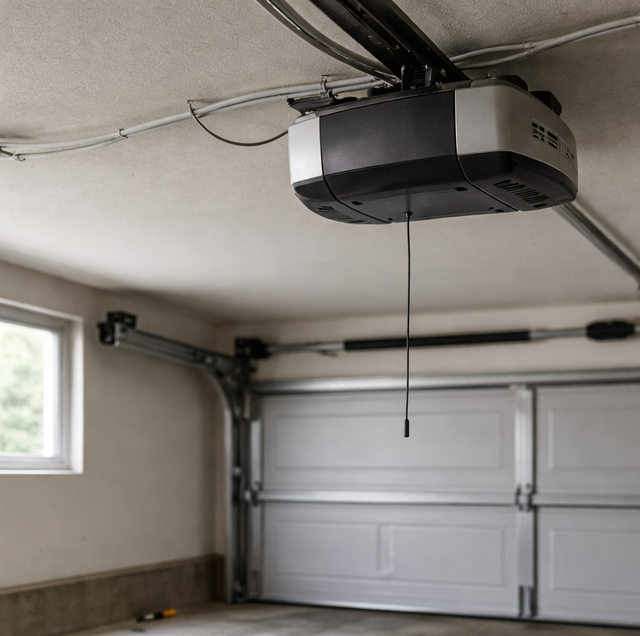
Look up at the motor unit. A thin wire, six inches or so, should be hanging straight down from the receiver. That is the antenna, and it does real work catching the remote's signal. People tuck it up out of sight during a cleanup or a repair, or it gets bent against the housing, and range drops off a cliff.
Let it hang free and straight, pointed down toward the floor, clear of metal framing and the motor housing. If the wire is broken, crimped, or has been snipped, that alone can shrink your working range to almost nothing. Straightening a tucked-up antenna is a fix that costs nothing and takes ten seconds.
Range and Interference
If the remote works up close but not from the street, you have a range or interference problem rather than a dead unit.
LED bulbs are a common offender: Some cheaper LED and CFL bulbs throw off radio noise on the same frequencies the opener listens on. Screw one into the opener's light socket, and it can jam the receiver from inches away. If your remote stopped working right after you swapped the opener bulb, that is your suspect. Bulbs sold as garage-door-rated or simply going back to the old bulb usually clears it.
Other transmitters and metal: A new gate remote, a neighbor's equipment, a Wi-Fi bridge, even a cheap electronic device plugged in nearby can crowd the airwaves. Metal RV covers, foil-backed insulation, and a car's own body can all block or weaken the signal. If range dropped suddenly, think about what changed near the garage recently.
The Lock or Vacation Button
This one fools everybody. Many wall consoles have a "lock" or "vacation" button, sometimes just a small slide switch. Its whole job is to disable the remotes while leaving the wall button working, so nobody can open the door from outside while you travel.
If a kid, a guest, or an elbow bumped it, every remote in the house goes dead at once while the wall button keeps working perfectly. It is a maddening symptom with a one-second fix. Press and hold that lock button for a few seconds until the console light stops blinking, then test a remote. If all your remotes died together and the wall button is fine, check this before anything else.
If every remote in the house quits at once while the hardwired wall button still runs the door, suspect the lock or vacation button on the wall console. A bumped lock switch disables all the remotes on purpose, and pressing and holding it for a few seconds until the console light stops blinking brings them back.
A Worn Remote Button
A clicker that rides in a pocket or gets pressed thousands of times can wear out the contact under the button itself. The tell is a remote that works only when you press a certain edge, mash it hard, or hit it several times. The battery is fine, and the pairing is fine, but the physical switch is tired. A remote like that is due for replacement rather than repair, since the internals are not worth rebuilding.
When It Is the Opener's Receiver or Logic Board
If you have changed the battery, confirmed the wall button runs the door, freed the antenna, ruled out the lock button, and re-pairing simply will not take, the trouble has moved inside the opener. The receiver board or the main logic board can fail from age, a nearby lightning strike, or a power surge, and when it does, no remote will pair, no matter how clean your technique.
That is the point to call a pro. A technician can test the board, confirm whether the receiver still reads codes, and add an external receiver or replace the board rather than the whole opener when that makes sense. This is also the moment to mention safety. If the door ever starts opening on its own, refuses to reverse when something is under it, or behaves erratically, stop using it and get it looked at, because that points to a control or sensor fault, not a remote quirk. Keep the photo-eye safety sensors down near the floor clean and aligned and never bypass them, keep remotes away from small kids, and never leave a paired remote in a car handed to a valet or parked at a shop.
Frequently Asked Questions
Most coin-cell remotes run two to three years on a battery, though a remote used many times a day or stored in a hot car drains faster. A slow drop in range over a few weeks is the classic early warning, so if you find yourself pulling closer to the door than you used to, change the cell before it dies completely.
Yes, and it is a useful clue. Remotes are paired individually, so a single dead one usually means its own battery, a worn button, or a lost code, not an opener fault. When every remote and the keypad all quit at the same moment, the odds shift toward the wall console's lock button or the opener's receiver instead.
A universal remote can replace a lost or broken clicker as long as it supports your opener's frequency and rolling-code system, which most name brands do. You program it to the opener the same way with the learn button. The catch is that very old openers using a fixed dip-switch code or a proprietary format may not be compatible, so match the remote to the opener before buying.
That pattern usually points to interference rather than the remote. Solar equipment, a neighbor's device on a timer, or nearby radio traffic can come and go on a schedule, crowding the opener's frequency at certain hours. A battery that is on its way out can also seem inconsistent as temperature swings between a cold morning and a warm afternoon.
Not usually. A quality opener keeps its paired codes in nonvolatile memory, so remotes survive a power blip fine. If a surge came through with the outage, though, it can scramble the receiver, in which case re-pairing or, in a hard hit, a board repair is the fix. A surge protector on the opener's outlet is cheap insurance against that.
If the wall button runs the door smoothly and the door reverses correctly on the safety sensors, using the wall button while you sort the remote is fine. If the door hesitates, reverses for no reason, or the sensors are misaligned, hold off and have it checked, because a remote symptom sometimes rides alongside a real safety fault that needs a trained eye.
Still stuck in the driveway — let Arnold get your remote and opener talking again. Arnold's Garage Door & Gates serves Fort Worth, Alvarado, and the DFW metroplex. Call Arnold: 682-337-7220.
