
Reset is a borrowed word once it lands on a garage door opener. It arrives carrying an assumption from everywhere else it gets used: that one button somewhere on the unit wipes the memory clean and starts the machine over. No residential opener built in recent decades works that way, and none was built to.
What sits on that motor housing and wall console is a set of separate controls, each doing one narrow job. A cord running to a ceiling outlet. A small pairing button near the antenna. A lock switch on the wall console. Dials or a menu screen governing how far the door travels and how hard the motor pushes. A breaker or a ground-fault outlet upstream that never touches the opener's memory at all. Knowing which one you mean is most of what separates a quick fix from a service call that runs twice as long as it should.
A Power Cycle Clears the Board's Short-Term Memory
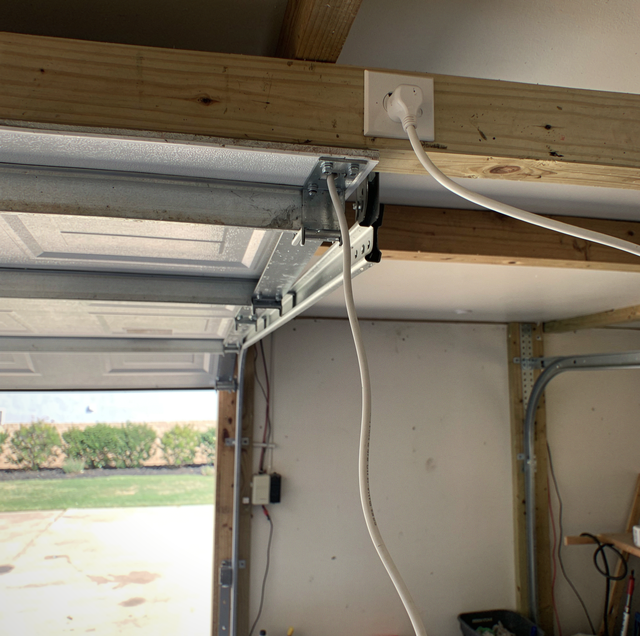
Pulling the plug at the ceiling outlet, waiting a moment, and plugging it back in is the closest thing an opener has to a true reset, and it's also the one control fully within reach of anyone in the household. The logic board loses power, drops whatever it was holding in short-term memory, and restarts in its normal startup state. That's often enough to clear a wall console that stopped responding after a brief power flicker, or a board that latched onto an error condition it no longer needs to hold.
What a power cycle does not touch is worth knowing before you try it as a cure-all. Every transmitter the opener has learned stays learned. The travel limits stay exactly where they were set. The force settings don't move. If the real issue is mechanical, a stripped gear or a drive component that's slipping, it's still there the moment power comes back. A power cycle resets the board's current state, and the door itself arrives back exactly as it was.
The Learn Button Pairs Remote Controls to the Receiver
The small button on the back or side of the motor housing, usually near where the antenna wire comes out, is a pairing control. Its job is to teach the receiver a code from a remote, a keypad, or an in-car system, so the opener recognizes that transmitter going forward. That is a real function, and it's the one people most often mean when they say reset. What it governs is the list of devices allowed to talk to the receiver, a list that sits entirely separate from the travel and force values stored elsewhere on the board.
Clearing that memory is a household-wide event. When a technician wipes the pairing list, every transmitter the opener has ever learned goes at once: every handheld remote, every wireless keypad, every in-car control, all of them dead in the same moment and all of them needing to be paired again from nothing. That scope is exactly why the work belongs to a service visit rather than something tried between other troubleshooting steps. Getting there midway through a diagnosis means walking back into a house full of dead remotes on top of whatever problem sent you looking for a reset in the first place.
On Chamberlain and LiftMaster units, the learn button's color marks the control generation: purple, orange, yellow, and red have shipped across different production years. Genie marks its program control differently. A technician reads that color to know which remotes pair.
The Wall Console Lock Button Suppresses Remotes Without Erasing Them
Full-featured wall consoles include a lock or vacation button alongside the door and light buttons. Its job is to make the opener ignore all wireless transmitters while the wall button itself continues to work normally. It exists so a household leaving for a week can keep a stray signal from opening the door on an empty house.
That one button is the most likely real answer when every remote quits at once and the wall control still runs the door. The pairing list is intact underneath it. The travel limits and force settings never moved. The opener is doing precisely what it was told to do, and it keeps doing it until the lock goes back off. It also gets triggered by accident more often than on purpose, usually by somebody cleaning around the console or a kid reaching past it for the light button.
Travel Limits Set How Far the Door Moves Before It Stops
Travel limits tell the opener exactly where fully open and fully closed are. The board tracks that distance internally, counting motor rotations or reading an encoder depending on the model, and stops the door at each end based on that stored number rather than anything the door itself is doing. When those limits are correct, the door stops flush with the floor going down and clears the header going up without excess travel in either direction.
When they've drifted, the door can reverse just short of the floor, stop before it's fully open, or keep straining against the frame after it should have already stopped. None of that is a memory glitch that a power cycle will fix, and no button snaps the number back to where it belongs. Re-establishing correct travel limits means running the door through its cycle while adjusting it based on how it actually behaves in real time, which is exactly why it's a technician's task rather than a homeowner's control.
Force Settings Set How Hard the Motor Pushes Before It Stops
Force settings work alongside travel limits but measure something different: how much resistance the motor will push against before treating it as an obstruction and reversing or stopping. That threshold is tied directly to the opener's auto-reverse safety function, which is exactly why it isn't something to leave loosely set in either direction. Too low, and the door won't finish a cycle against ordinary resistance. Too high, and it may keep pushing past resistance it should have respected instead.
Re-establishing correct force is a technician's adjustment, made against how the door is actually behaving, rather than a dial turned until it feels right. That pattern explains many calls that start with someone asking for a reset. Often, the opener works exactly as designed. It's correctly refusing to push past its force setting because the door itself is fighting it, a track pulling out of alignment, a roller binding in its channel, resistance that has nothing to do with the opener's programming and everything to do with the door it's trying to move.
The Reset Button on a GFCI Belongs to the Circuit
A ground-fault outlet carries a reset button right on its face, and it is the only button in this entire discussion that actually wears the word. That button restores power to the circuit. The opener's learned transmitters, travel limits, and force values sit on the far side of it, unchanged and unreachable from that outlet.
A breaker in the panel works on the same principle a step further upstream. Confirming whether the breaker feeding the garage has moved to the tripped position is a check anyone can make safely. What happens after that check is where the decision turns serious.
Checking whether a breaker sits in the tripped position is safe. Switching one back on that trips again, or that tripped while the opener sat idle, is not: that circuit is holding back a live fault. Have it tested first.
Most Residential Openers Have No Factory Restore for the Owner
Some consumer electronics really do offer a single control that wipes every setting back to out-of-box condition in one action. Most residential garage door openers don't offer that as something the owner can trigger. Getting back to a clean baseline on one of these units means handling several separate tasks: clearing the pairing list, walking the travel limits and forcing a return to correct values, and dealing with any smartphone app connection on its own. Each is a distinct control with its own function, and none of them are stages in a single restore process.
That's usually where the search for a reset button ends, and it's worth sitting with why. The single control was never built in the first place because the opener was never designed with the idea that everything should be able to return to zero at once. Each piece was built to be set once, deliberately, and then left alone.
The Word Persists Because Six Controls Never Got One Name
Reset survives as the word for this because English didn't give a household six separate names for six separate opener controls, so one borrowed word ended up covering them all. It's a habit of language more than a description of the hardware. The opener just has a power connection, a pairing button, a lock switch on the wall console, two settings that get adjusted together, and a circuit somewhere upstream that can fail on its own.
Asking a technician for a reset usually gets you a few questions back before anything gets touched: is the door not responding to the remote at all, is it reversing early, did it stop working right after a storm knocked the power out? Those questions narrow six possible controls down to the one that's actually implicated, because working on the wrong one wastes a visit and can leave the right problem untouched. Naming the symptom you're seeing, rather than reaching for the word "reset," ensures the correct control is addressed on the first visit rather than the second.
Frequently Asked Questions
No. The rolling-code chip inside the remote holds its identity in non-volatile memory, so a dead battery or a swap doesn't erase what the opener learned. Slide the new cell in and the remote picks up where it left off. A remote that still does nothing even with a fresh battery tells you the problem was never the battery.
Not usually. On Wi-Fi-connected models, the app module keeps its own network credentials separate from the motor board's memory, so a power cycle restarts the motor logic without clearing the app's connection. Reconnecting or re-pairing that link, if needed, is handled through the app itself rather than by anything at the opener.
On DC-motor models equipped with battery backup, the backup battery keeps part of the board powered even after the cord is pulled, since that's exactly what it's there to do during an outage. On those units, a cord pull alone does not drop board power, which is one reason the full sequence is part of a service visit.
Yes, indirectly. HomeLink stores its own learned code in the visor unit, pairs it with the opener during setup, and clearing the opener's pairing memory removes it from the opener's side of that pairing. The visor button then has to be re-taught through its own in-vehicle programming sequence, separate from anything done at the opener.
It can. The keypad itself stores the PIN a person types, while the receiver stores the keypad's transmitter identity the same way it stores a remote's, so clearing that memory removes the keypad's access along with everything else. It's an easy detail to forget when troubleshooting, since the keypad isn't a remote in your hand.
No. A replacement board arrives with an empty transmitter list and no stored travel data, so pairing and limits both get established fresh on the new board during that same visit. It's worth counting every transmitter in the house before that work starts, keypads and visor buttons included, so nothing gets left unpaired afterward.
Stop guessing which button or control will clear the fault and book opener repair with a technician who knows the difference and gets it right on the first visit. Call or text Arnold at (682) 337-7220.